Android Studio Quail has moved well beyond the early channel mix this page previously covered. Android Studio Quail 4 Patch 1 is now the final stable Quail release, bringing the series together around more capable AI-assisted workflows, stronger Android-specific guidance, practical Compose inspection, and a cleaner route from project work to testing and publishing. For developers coming from Android Studio Panda, this is the Quail build to use as the main upgrade point.
Quail 4 Patch 1 is based on 2026.1.4 Patch 1 and ships alongside Android Gradle Plugin 9.4.1. It is a maintenance release rather than a separate feature branch, so it combines the full Quail 3 and Quail 4 feature set with important build-tool reliability fixes. Quail is now complete; developers looking for the newest preview channel should use Google’s Android Studio preview page, where development has moved on to Rabbit.
The practical reason to update is not only the new build number. Quail now gives the Android Studio agent better Android context through built-in skills, more controlled planning for larger changes, local-model options when source code should remain on the machine, and clearer ways to review what an agent changed. The sections below cover the stable download, the Quail features worth knowing, and the verified checksums for every platform package.
Download Android Studio Quail 4 Patch 1
Quail 4 Patch 1 is the recommended Quail build for production work, team use, and regular project development. The links below open the matching SuperFiles download page, which hands off to Google’s official package URL. File names, sizes, and SHA-256 values are verified against the Android Studio archive.
| Platform | Android Studio package | Size |
|---|---|---|
| Windows (64-bit) | android-studio-quail4-patch1-windows.exe | 1.5 GB |
| Windows (64-bit ZIP) | android-studio-quail4-patch1-windows.zip | 1.5 GB |
| macOS Intel | android-studio-quail4-patch1-mac.dmg | 1.5 GB |
| macOS Apple Silicon | android-studio-quail4-patch1-mac_arm.dmg | 1.5 GB |
| Linux (64-bit) | android-studio-quail4-patch1-linux.tar.gz | 1.5 GB |
| ChromeOS | android-studio-quail4-patch1-cros.deb | 1.2 GB |
If this is your first Android Studio installation, follow our Android Studio installation guide for Windows. The ZIP package is useful for a portable or side-by-side Windows setup; for normal installations, use the standard installer for your operating system.
What’s New in Android Studio Quail
Android Skills put Android context into Agent Mode
Quail 4 includes 23 curated Android skills that the agent can select automatically when a request needs Android-specific help. They cover areas such as upgrading to AGP 9, Android Profiler work, Navigation 3, and adaptive UI. This is more useful than a generic coding suggestion because the agent has a better starting point for Android conventions and tooling rather than treating an Android project like any other codebase.
The bundled skills do not require a separate download, and teams can create their own skills for internal conventions or repeated workflows. The Android CLI can also add the full set outside the IDE with android skills add --all. If you do not want them active, Android Studio provides an IDE-wide setting to disable the bundled skills.
Firebase setup from the agent
Quail 4 can use Firebase agent skills to help configure services from Agent Mode. That means an Android project can move from UI work toward Firebase Authentication or Cloud Firestore setup without treating backend configuration as a disconnected task. Review the resulting Firebase configuration carefully, but this is a useful shortcut when you are building a new app flow and want the IDE to keep the Android and Firebase steps connected.
Gemma 4 can run locally inside Android Studio
Quail adds an integrated local-model option through Gemma 4. You can choose it from the Agent model selector or configure it under Settings > Tools > AI > Model Providers > Gemma; Android Studio downloads, verifies, and updates the model. The trade-off is hardware: smaller models need at least 12 GB RAM, while 32 GB or more is the practical target for the best experience.
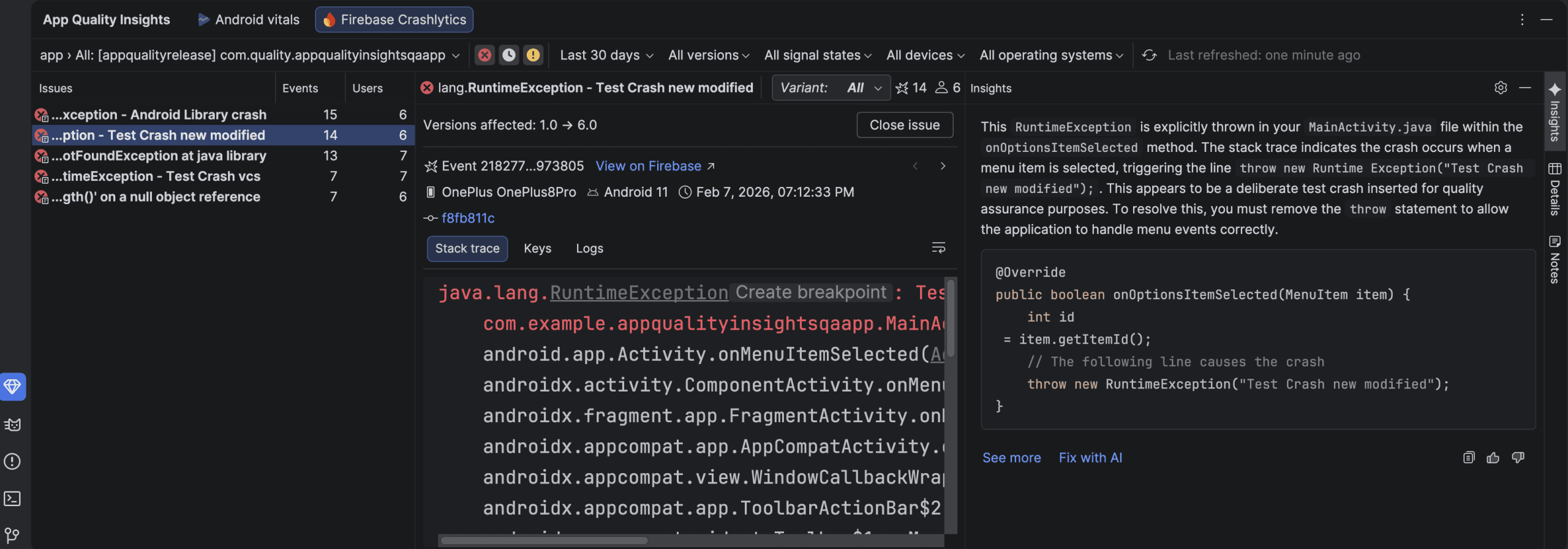
Local inference is not automatically the fastest choice, nor does it replace every hosted model. It is valuable when privacy, offline use, local source-code control, or avoiding hosted-model quota is more important. It can still handle agentic tool calls and multi-file refactors while the code stays on your machine.
Planning Mode makes larger agent tasks easier to review
Quail 3 improved the controlled side of Agent Mode. Start with /plan or switch the conversation to Planning, then let the agent map an implementation before it changes code. You can review that plan, send comments, and have it revised. Only select Proceed once the approach is right. When the work is finished, Android Studio provides a summary of the changes for review.
This is the better workflow for a refactor, dependency upgrade, or change that touches several modules. It gives you a checkpoint before execution instead of treating an agent response as a black box.
MCP Marketplace and conflict resolution with Agent
Quail 3 also introduced the MCP Marketplace at Settings > Tools > AI > MCP Servers. From there, developers can browse, install, and manage Model Context Protocol servers, switch registries, and filter server types including NPX, Docker, and Python. It opens a more direct path for connecting the IDE agent to developer tools, registries, and team databases.
In the Commit tool window, Merge Conflicts with Agent can launch an agent session focused on files with merge conflicts. It can help form a resolution, but the final diff still deserves the same review you would give any manual conflict resolution before committing it.
Parallel chats are easier to monitor and review
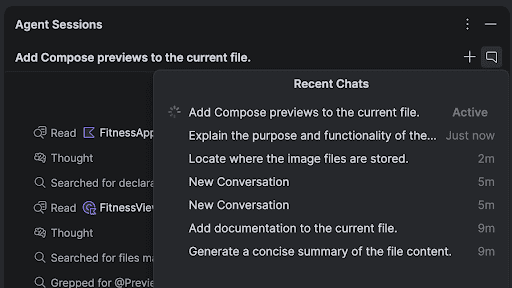
Quail retains the parallel Agent Mode workflow and makes it more legible. Class names, methods, functions, and file paths in agent replies are clickable. The Recent Chats panel now shows whether background work is running, waiting for input, or ready to review, while the older separate task and walkthrough output is consolidated into a Summary of Changes tab. Reasoning-model output can be collapsed, keeping a long chat readable without hiding the context behind a change.
AI model and capacity choices
Android Studio includes a default Gemini model, with Google adjusting its capability level over time. Developers who need newer Gemini models or more capacity can use a Google AI Studio API key, while compatible remote providers such as Anthropic and OpenAI can also be configured. Google AI Pro and Ultra accounts can add premium capacity and higher limits; Gemini Enterprise is rolling out to selected organizations through the latest Canary with Google Cloud privacy and security controls. None of those upgrades are required for normal Studio use.
Compose preview and recomposition inspection
Compose Interactive Preview in Quail 4 can simulate back-navigation transitions with a Navigate Back action and a Predictive Back Progress slider. This makes it easier to inspect custom back and forward transitions before deploying to a device or emulator. Quail also keeps the screenshot-testing workflow useful for checking visual states early, especially on Compose-heavy projects.
For recomposition analysis, use compose.ui:ui:1.10.0 or the Compose BOM 2025.12.01 or later. In Layout Inspector, enable Observe Recomposition > Observe All or choose Recomposition > Observe Node. Select a recomposition count in the Component Tree to open State Inspection, inspect invalidated state reads, and move through historical recompositions for that node. The Explain with AI action can help translate the result into a starting point for investigation.
More Quail tools worth knowing
The Quail series also brought Android CLI support for skills outside the IDE, peer-to-peer Android Emulator multi-device testing, ADB Wi-Fi 2.0, and native Google Play testing-track publishing. These are not replacement features for the main download workflow, but together they reduce the friction around repetitive Android development work that normally spills into separate tools.
Quail 4 Patch 1 maintenance fixes
Quail 4 Patch 1 is paired with AGP 9.4.1 and focuses on reliability rather than adding a new user-facing feature set. The update fixes an AGP optimization DSL issue, D8 and R8 regressions affecting debug builds and verification, invalid Windows .kotlin_module filenames, nondeterministic dex and mapping output, intermittent malformed dex files that could crash an app at launch, high per-rule memory use, and VerifyError cases including Android 4.4 compatibility. Those are practical reasons to choose Patch 1 over the original Quail 4 build.
Android Studio Quail release history
| Release | Version | Date | Status / notes |
|---|---|---|---|
| Quail 4 Patch 1 | 2026.1.4 Patch 1 | September 18, 2026 | Current and final Quail stable build; paired with AGP 9.4.1. |
| Quail 4 | 2026.1.4 | September 1, 2026 | Final stable Quail release. |
| Quail 3 Patch 1 | 2026.1.3 Patch 1 | August 10, 2026 | Stable maintenance update. |
| Quail 3 | 2026.1.3 | July 30, 2026 | Stable release introducing Planning Mode, MCP Marketplace, and merge-conflict assistance. |
| Quail 2 Patch 1 | 2026.1.2.11 | July 23, 2026 | Superseded stable release. |
Release channels and side-by-side installs
Use Quail 4 Patch 1 as the stable installation for normal work. Google’s compatibility information lists Quail 4 with AGP versions 7.1 through 9.3, while the current Patch 1 release is published alongside AGP 9.4.1; those statements describe compatibility and the paired release, not two competing recommended versions. If you need a future feature, install the current preview in a separate folder and test it on a branch. Do not use an old Quail RC or Canary as the current preview recommendation now that Rabbit has replaced Quail in that channel.
Android Studio Quail system requirements
Use a supported 64-bit Windows, macOS, Linux, or ChromeOS environment that meets Google’s current Android Studio system requirements. 8 GB RAM is a practical baseline, while 16 GB or more is better for the emulator, large projects, and heavier tooling. If you plan to use Gemma locally, treat 12 GB as the minimum for smaller models and 32 GB or more as the sensible target.
SHA-256 checksums
07fb2a6d54d14b137e2a5db274ba0e70be9291eb4245707f53164bb30cd69e95— android-studio-quail4-patch1-windows.exe2b884e086b5afaa63049dc5ea79b1cf6fb1b885bad91b7ea226b8cd88bb37eb6— android-studio-quail4-patch1-windows.zip20a40200b63110c1ebff36960cd0ffc8aa61018c8269cc16979d5253a204f9d3— android-studio-quail4-patch1-mac.dmg1a3393306007f90cbf2ee73e45beb809ab09aa406c2f61ee9fe81b4ef511c066— android-studio-quail4-patch1-mac_arm.dmg25c97ca6c6b505f2a20bff962dfd28718327f61e25b09a9bc915f1dae7b1e534— android-studio-quail4-patch1-linux.tar.gzdfac5ddd8d490c732a7c8bfa3393eccbc400022190da60fef4e757adc5c08f6f— android-studio-quail4-patch1-cros.deb
Android Studio Quail FAQs
Is Android Studio Quail stable?
Yes. Android Studio Quail 4 Patch 1 is the final stable Quail release and is the right Quail version for everyday work.
What is the newest Quail preview?
There is no current Quail preview branch. Preview development has moved to Rabbit; check Google’s preview download page for the current release candidate and Canary builds.
Which Quail build should I use for production work?
Use Quail 4 Patch 1. It includes the completed Quail feature set and the latest Quail maintenance fixes.
Where can I download older Android Studio versions?
For the prior stable line, see our Android Studio Panda download guide. Google also maintains the official Android Studio archive for historical packages.
Quail 4 Patch 1 is the complete Quail upgrade: use it for the stable IDE, keep future preview work separate, and verify the package checksum before installing if you need an additional integrity check.